Showing posts with label Activity. Show all posts

Wednesday, September 23, 2009

Turtle Art

During a few weeks of our Control technology lessons, we have been making shapes on an activity called Turtle Art. This activity has many features to create different shapes in many different sizes.

Here is an example of a shape which I created.
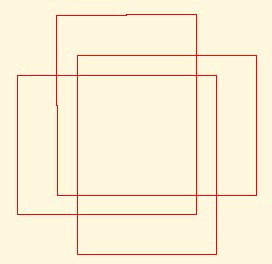
While creating this shape, I was inspired by it because it looked easy. The problem I had with this shape was changing the variables to make them the correct size. I had to play around with the numbers until I got the right size for the lines.

There are three main lines in this shape. Once I figured out the three lines, I repeated it 3 times and then it gave me the result of this shape.

I didn't have any help from anyone and I completed this shape by myself. I only needed to correct my problem as my teacher pointed out an error which I had made with changing the variables to create the lines.

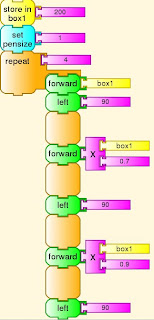
Here is the script of my shape.

Friday, September 4, 2009

Physics 2

During some of our control technology lessons, I have been working on a Physics activity.


I created a human figure that moved based on the circles around it.

Here is the screenshot of my human figure.

The figure moves by having the big four balls around it rotating. the big balls then rotate the small balls around them. The figure is attached to the four balls and it's leg and arms move. The head is pinned down so that it won't move.

The figure moves it's arms and legs randomly.

This was the best thing that I have created on Physics so far and I hope to learn more in the near future.

Friday, August 14, 2009

Physics Game

On the Fridays of our Control Technology lesson, we were making games to play with on the Physics activity. Our goal was to create a game which we were able to play and have fun with.


The aim of the game is to draw a ball at the top of the screen and then hope it drops into one of goals at the bottom. There are three goals and each are worth either one, two or three points.

The sticks and triangles in the middle of the screenshot are obstacles which rotate and spin to toss the ball around the screen.

The game depends on luck and you can't control your ball. It is cool to see the ball get tossed around by the spinning obstacles.

The people who worked in this group to develop this game are: asian-bruce-lee, control-tech-sama and bongbong123.

Friday, July 31, 2009

Memorize Activity - Sugar OS

Today I'm playing the Memorize activity on the Sugar operating system.

I didn't understand this game when I first played it, but after that I soon learnt how to play. To play the game, you have to click one of the number '1' on the top and then click one of the number '2' at the bottom. The number 1's have maths problems and the number 2's have the answers.

This game is very fun because it's confusing and makes you think a lot. You can change what's hidden behind the cards. Some of the additional changes are addition, letters and sounds. You can also change the amount of cards on the screen. There are 4x4, 5x5 and 6x6 options. 6x6 is the hardest and 4x4 is the easiest.

Here is a screen shot of the memorize activity.


I rule !!! =D

Thursday, July 30, 2009

Physics Activity

During our lesson today, I was testing the functions of the Physics activity in the Sugar Operating System. This activity is very creative and you are able to do many things with it such as creating a fun game where you and your friends can play.

I really enjoyed this activity because I could create so much games with the different functions. Some of the functions are: move, grab, drag, draw, place, motor, pin, joint, play and pause objects if you don't want the objects to move.

I hope many other users who use this operating system can find this activity fun and play games with their friends.

Here is an example of myself playing with Physics.