Showing posts with label Sugar. Show all posts

Wednesday, September 23, 2009

Turtle Art

During a few weeks of our Control technology lessons, we have been making shapes on an activity called Turtle Art. This activity has many features to create different shapes in many different sizes.

Here is an example of a shape which I created.
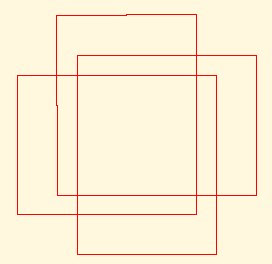
While creating this shape, I was inspired by it because it looked easy. The problem I had with this shape was changing the variables to make them the correct size. I had to play around with the numbers until I got the right size for the lines.

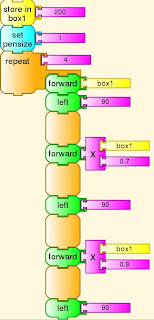
There are three main lines in this shape. Once I figured out the three lines, I repeated it 3 times and then it gave me the result of this shape.

I didn't have any help from anyone and I completed this shape by myself. I only needed to correct my problem as my teacher pointed out an error which I had made with changing the variables to create the lines.

Here is the script of my shape.

Friday, September 4, 2009

Physics 2

During some of our control technology lessons, I have been working on a Physics activity.


I created a human figure that moved based on the circles around it.

Here is the screenshot of my human figure.

The figure moves by having the big four balls around it rotating. the big balls then rotate the small balls around them. The figure is attached to the four balls and it's leg and arms move. The head is pinned down so that it won't move.

The figure moves it's arms and legs randomly.

This was the best thing that I have created on Physics so far and I hope to learn more in the near future.

Sugar Icon

During our control technology lessons, we have been learning how to hack Sugar. One of the things we learnt to do is to change the icon of the Sugar.

Here is a screenshot of my icon.
Changing the icon involves using the html-kit or notepad. You have to first draw it on graph paper and then plot the coordinates.

After finishing my icon, I had a lot of trouble replacing it onto the Sugar icon because I mispelt the word ' color ' and named it ' colour ' instead. The Sugar recognises the American words and thought the colour as an error.

This made me stress a lot because I could never get it working. After our teacher took it home and tried it himself, he worked out that I had mispelt the word color.
Here is a screenshot of my Sugar homepage with my icon and all the activities around it.

Friday, July 31, 2009

Memorize Activity - Sugar OS

Today I'm playing the Memorize activity on the Sugar operating system.

I didn't understand this game when I first played it, but after that I soon learnt how to play. To play the game, you have to click one of the number '1' on the top and then click one of the number '2' at the bottom. The number 1's have maths problems and the number 2's have the answers.

This game is very fun because it's confusing and makes you think a lot. You can change what's hidden behind the cards. Some of the additional changes are addition, letters and sounds. You can also change the amount of cards on the screen. There are 4x4, 5x5 and 6x6 options. 6x6 is the hardest and 4x4 is the easiest.

Here is a screen shot of the memorize activity.


I rule !!! =D

Thursday, July 30, 2009

Physics Activity

During our lesson today, I was testing the functions of the Physics activity in the Sugar Operating System. This activity is very creative and you are able to do many things with it such as creating a fun game where you and your friends can play.

I really enjoyed this activity because I could create so much games with the different functions. Some of the functions are: move, grab, drag, draw, place, motor, pin, joint, play and pause objects if you don't want the objects to move.

I hope many other users who use this operating system can find this activity fun and play games with their friends.

Here is an example of myself playing with Physics.

Wednesday, July 22, 2009

Sugar OS

My first impression of the Sugar operating system was that it was very simple and easy to use. It’s a bit slow but because it’s such a small subnetbook, it wouldn’t have much speed. Many features in this operating system are fun and may help children learn many things.

This operating system is different from the other ones which are official but it still good features. The system is a bit difficult to navigate for young children but once they get the hang of it, it should be a breeze.

Although the Sugar operating system is good, it only has a simple layout which is created for children to use.


This is a picture of the XO subnetbook.