Wednesday, September 23, 2009

Turtle Art

During a few weeks of our Control technology lessons, we have been making shapes on an activity called Turtle Art. This activity has many features to create different shapes in many different sizes.

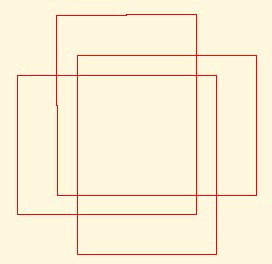
Here is an example of a shape which I created.

While creating this shape, I was inspired by it because it looked easy. The problem I had with this shape was changing the variables to make them the correct size. I had to play around with the numbers until I got the right size for the lines.

There are three main lines in this shape. Once I figured out the three lines, I repeated it 3 times and then it gave me the result of this shape.

I didn't have any help from anyone and I completed this shape by myself. I only needed to correct my problem as my teacher pointed out an error which I had made with changing the variables to create the lines.

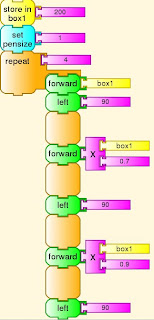
Here is the script of my shape.


Friday, September 4, 2009

Physics 2

During some of our control technology lessons, I have been working on a Physics activity.


I created a human figure that moved based on the circles around it.

Here is the screenshot of my human figure.

The figure moves by having the big four balls around it rotating. the big balls then rotate the small balls around them. The figure is attached to the four balls and it's leg and arms move. The head is pinned down so that it won't move.

The figure moves it's arms and legs randomly.

This was the best thing that I have created on Physics so far and I hope to learn more in the near future.

Sugar Icon

During our control technology lessons, we have been learning how to hack Sugar. One of the things we learnt to do is to change the icon of the Sugar.

Here is a screenshot of my icon.
Changing the icon involves using the html-kit or notepad. You have to first draw it on graph paper and then plot the coordinates.

After finishing my icon, I had a lot of trouble replacing it onto the Sugar icon because I mispelt the word ' color ' and named it ' colour ' instead. The Sugar recognises the American words and thought the colour as an error.

This made me stress a lot because I could never get it working. After our teacher took it home and tried it himself, he worked out that I had mispelt the word color.
Here is a screenshot of my Sugar homepage with my icon and all the activities around it.

Friday, August 14, 2009

Physics Game

On the Fridays of our Control Technology lesson, we were making games to play with on the Physics activity. Our goal was to create a game which we were able to play and have fun with.


The aim of the game is to draw a ball at the top of the screen and then hope it drops into one of goals at the bottom. There are three goals and each are worth either one, two or three points.

The sticks and triangles in the middle of the screenshot are obstacles which rotate and spin to toss the ball around the screen.

The game depends on luck and you can't control your ball. It is cool to see the ball get tossed around by the spinning obstacles.

The people who worked in this group to develop this game are: asian-bruce-lee, control-tech-sama and bongbong123.

Thursday, August 6, 2009

Joel Stanley Guest Speaker

During our control technology lesson on Wednesday, the 5th of August, Joel Stanley came into our class as a guest. We had to ask questions and he replied them for us about what he does and who he is.

The questions which we asked and he answered are listed below.

Q. What do you do?


A. I study at the University of Adelaide, Computing Systems Engineering.


Q. What made you study it?


A. I was at a year 10 camp where we explored the University and the I was interested in the engineering.


Q. How did you learn to type?


A. I started of learning to touch type with MSN.


Q. What is your project?


A. Making XO’s. XO’s can last up to 65 degrees


Q. How long did you work on this for?


A. I worked on it for 10 weeks.


Q. What does MIT stand for?


A. MIT = Massachusetts Institute Technology. It is where internet and pc’s come from, and Guitar Hero also was developed there.

Q. Are you a Linux fan or Microsoft?


A. Linux

Q. Why?


A. It is a free open source software


Q. Why is there another arrow?


A. Arrow is pointing to Romania; they were going to get the XO’s


Q. What happened to the XO on the screen?


A. The XO came back from a trial. XO’s are hard and you can drop it any where but not too high.


Electric Engineering is a job where it's related to the hardware of electronics.


Q. What do you do at your work?


A. I check how much power usage the XO was using for every part.


Q. What part uses the most power?


A. The display uses a large amount of power. CPU is the next part that uses a lot of power.


Every 1 in 1000 XO’s are checked when they are sent out.


A person named Mary Lou invented the screen for the XO. Richard Smith worked on the hardware and low level parts.


Q. What are the two flip flops on the side of the XO for?

A. The two flip flops on each side of the screen are antennas.


Q. What are the coloured arrows representing on the map?

A. Green arrows potential trial sights. Purple and red are trial sights. Map is a year old and it shows where the XO’s are going to be deployed.


Q. How long did you stay in America?


A. I stayed in America for three months. It is a very fun job and also fun to meet with very smart people.


There is a Google project which gets university students to work on open source programs for three months.


In America, rich people can buy 2 laptops. One for you and other one goes to someone around the world.


LPC => NGO => Non-Government Organisation


XO has three touch pads. One for your fingers and the whole thing for objects. The pads failed, so the newer versions of the XO only have one touch pad.


This is a picture of Joel's workstation.

Friday, July 31, 2009

Memorize Activity - Sugar OS

Today I'm playing the Memorize activity on the Sugar operating system.

I didn't understand this game when I first played it, but after that I soon learnt how to play. To play the game, you have to click one of the number '1' on the top and then click one of the number '2' at the bottom. The number 1's have maths problems and the number 2's have the answers.

This game is very fun because it's confusing and makes you think a lot. You can change what's hidden behind the cards. Some of the additional changes are addition, letters and sounds. You can also change the amount of cards on the screen. There are 4x4, 5x5 and 6x6 options. 6x6 is the hardest and 4x4 is the easiest.

Here is a screen shot of the memorize activity.


I rule !!! =D

Thursday, July 30, 2009

Physics Activity

During our lesson today, I was testing the functions of the Physics activity in the Sugar Operating System. This activity is very creative and you are able to do many things with it such as creating a fun game where you and your friends can play.

I really enjoyed this activity because I could create so much games with the different functions. Some of the functions are: move, grab, drag, draw, place, motor, pin, joint, play and pause objects if you don't want the objects to move.

I hope many other users who use this operating system can find this activity fun and play games with their friends.

Here is an example of myself playing with Physics.